
EXC_BAD_ACCESS crashes are among the most frustrating errors in iOS development. You see a memory address, no stack trace, no hints — just a blank console staring back at you. Later I learned that this crash is usually caused by accessing a deallocated object — a “dangling pointer” problem. And Xcode’s “Zombie Objects” debugging tool is specifically designed to handle this.
What Is a Zombie Object
In Objective-C, when an object’s reference count drops to zero, it’s normally deallocated and its memory is reclaimed. If code later tries to send a message to that memory — calling a method or accessing a property — it triggers an EXC_BAD_ACCESS crash.
This happens because the pointer still exists, but the object doesn’t. The memory might have been reallocated to other data, so accessing it leads to unpredictable behavior.
The principle of Zombie Object debugging: When you enable Zombie detection, the Runtime changes its behavior — when an object’s reference count reaches zero, the system doesn’t actually reclaim its memory. Instead, it “turns” the object into an _NSZombie.
This zombie object exists for one purpose: if anyone sends a message to it, it throws an exception and tells you “you sent a message to a deallocated instance.”
*** -[HyClass description]: message sent to deallocated instance 0x1b95990This is a typical zombie warning. It tells you that you tried to send the description message to an instance of HyClass at address 0x1b95990, but it had already been deallocated. This information, though brief, is far more useful than a single crash address.
How to Enable Zombie Object Detection
There are two ways to enable Zombie detection in Xcode.
Method 1: Enable in the Scheme (most common)
Click the Scheme name in the top-left corner of Xcode (next to the Run button), select Edit Scheme…. In the popup, select the Run tab, go to the Diagnostics panel, and check Zombie Objects.
Method 2: Use Instruments’ Zombies template
Launch Instruments via Product → Profile and select the Zombies template. After running and reproducing the crash, Instruments will show a dialog. Clicking the arrow lets you view the object’s complete lifecycle — where it was created, retained, and released.
Getting More Information with Environment Variables
In the Scheme’s Arguments panel, you can add two environment variables to enhance debugging:
NSZombieEnabled = YESMallocStackLoggingNoCompact = YES
The second variable makes Xcode record the allocation history for every memory address. Combined with LLDB’s bt command to print stack traces, you can trace back to the specific code line.
How to Read Zombie-Related Crash Reports
In crash reports, these patterns are typical signs of zombie objects:
Pattern 1: objc_msgSend at the top of the stack
Thread 0 Crashed:
0   libobjc.A.dylib                   0x00000001a186d190 objc_msgSend + 16
1   Foundation                        0x00000001a1f31238 __NSThreadPerformPerform + 232
...
objc_msgSend is the message-sending entry point. When it appears at the top of the stack, the runtime is trying to send a message to an object that no longer exists.
Pattern 2: objc_release at the top of the stack
Thread 2 Crashed:
0   libobjc.A.dylib                 0x00007fff7478bd5c objc_release + 28
1   libobjc.A.dylib                 0x00007fff7478cc8c AutoreleasePoolPage::pop + 726
This indicates the runtime is trying to release an already-deallocated object — an “over-release” issue.
Pattern 3: doesNotRecognizeSelector:
Last Exception Backtrace:
0   CoreFoundation    __exceptionPreprocess + 220
1   libobjc.A.dylib   objc_exception_throw + 55
2   CoreFoundation    -[NSObject doesNotRecognizeSelector:] + 139
Sometimes zombie memory gets reused by a new object. The new object’s type is different from the original, so when it receives a message it can’t handle, it triggers doesNotRecognizeSelector:. The console prints something like -[NSNumberFormatter playSound]: unrecognized selector. playSound clearly doesn’t belong to NSNumberFormatter — indicating that memory once held an object that could play sound, but it’s long gone.
Important Considerations When Enabling Zombie Detection
1. Only for debugging
Zombie detection is a debugging tool — never enable it in release builds. It keeps all deallocated objects in memory, causing memory usage to spike. Make sure to turn it off in Release mode.
2. Works under ARC too
ARC manages reference counting automatically, but dangling pointer issues can still occur — for example, with assign or unsafe_unretained object pointers, or with Core Foundation objects where reference counting isn’t properly managed. ARC doesn’t solve all memory issues, so zombie detection is still useful in ARC projects.
The Crash I Actually Had to Chase
The most useful Zombie session I ran started with a support report from a list screen. A user opened a detail page, went back quickly, and then tapped a row as a background refresh completed. The crash was intermittent and the normal report only showed objc_msgSend. I first blamed the network callback because it was the last code added, but the callback was only exposing an older ownership mistake.
With Zombies enabled, the same sequence stopped at -[OrderRowViewModel name]: message sent to deallocated instance. That changed the investigation from “which thread crashed?” to “who kept this row model after its owner released it?” I added a symbolic breakpoint for objc_exception_throw, reproduced the back-navigation five or six times, and copied the creation and release stacks from the Zombies instrument before restarting the app.
How I Narrowed the Ownership Bug
The release stack pointed to a temporary array used by the refresh callback. The view controller also kept an unsafe_unretained reference to the selected row so the callback could update the visible cell. When the data source replaced its array, the row was released, but the callback still ran on the main queue and sent name to the stale pointer.
__unsafe_unretained OrderRowViewModel *selectedRow = self.selectedRow;

dispatch_async(dispatch_get_main_queue(), ^{
    // The data source may have released selectedRow before this block runs.
    self.titleLabel.text = selectedRow.name;
});
The fix was to capture a strong local value for the short UI update and clear the selection when the data source changed. Zombie detection proved the lifetime failure; it did not replace the ownership reasoning. After the change, the same rapid navigation test completed with no zombie message, and the refresh callback ignored rows that were no longer part of the current snapshot.
What Zombies Can and Cannot Tell You
A zombie tells you that a message reached an object after its lifetime ended. It does not automatically identify the line that released the object, and it does not prove that the last message in the backtrace caused the original ownership mistake. I always save both sides of the story: the zombie message and the allocation/release history that Instruments recorded.
For a second crash, the message was cancel on a deallocated network task. The task had been stored in an assign property inherited from an older Objective-C controller. Replacing that property with a strong reference removed the crash, but I still kept the cancellation in viewDidDisappear so the controller did not retain work longer than needed. That distinction matters: a strong reference can fix a dangling pointer while still leaving a cancellation or ownership policy problem.
My Repeatable Zombie Checklist
- Reproduce the same user sequence with Zombies enabled, preferably on the build where the crash was reported.
- Copy the exact zombie class, selector, and address from the console before changing code.
- Use Instruments to inspect where the object was created and released; do not assume the crashing thread owns the bug.
- Search for
assign,unsafe_unretained, delayed blocks, delegates, timers, and callbacks that outlive their view controller. - Fix the ownership boundary, then repeat the original navigation or callback timing instead of relying on one clean launch.
- Turn Zombies off before performance testing; retained deallocated objects can make an otherwise normal screen look like a memory leak.
After the fix, I keep one regression test that replaces the data source while a refresh callback is queued. It does not depend on a particular pointer address or runtime implementation. It simply verifies that the callback either owns the model it reads or exits when the model is no longer current. That has been more valuable than memorizing the exact appearance of a zombie address.
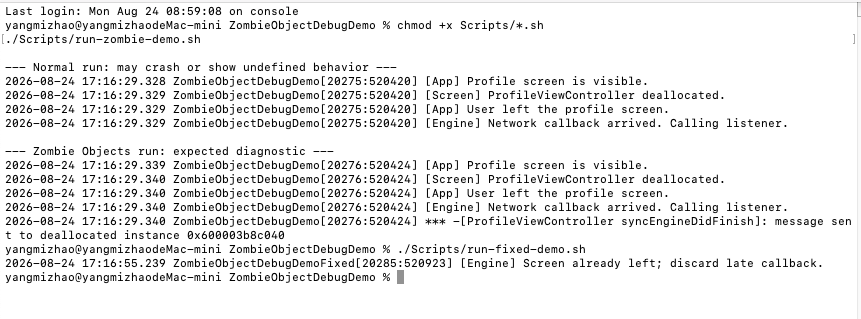
GitHub source code address:https://github.com/2252408699/ZombieObjectDebugDemo.git
